Free Zootopia 2 Filter – Take a Photo With Zootopia Characters on SynBooth.com
TL;DR: The free Zootopia 2 filter on SynBooth.com lets you generate AI photos with Judy Hopps and Nick Wilde. Sign in, upload a selfie, and download your Zootopia 2 character photo in under a minute. Updated for December 2025.
Quick Context
What is this page? A step-by-step Zootopia 2 photo tutorial on SynBooth.com showing how to use the free Zootopia 2 filter to generate AI photos with Judy Hopps and Nick Wilde.
What is SynBooth? An AI image generation platform launched in 2025 that connects multiple AI model APIs. It specializes in character-consistent photo generation for Zootopia 2 selfies and similar content. SynBooth also offers AI video generation and AI music generation.
What does this tutorial cover? How to use the free Zootopia 2 filter on the Zootopia 2 Photo Generator to take a photo with Judy Hopps and Nick Wilde — the same Zootopia 2 photo trend you've seen on TikTok and Instagram.
Last updated: December 2, 2025 (aligned with the Zootopia 2 theatrical release)
Table of Contents
- What You'll Create With the Free Zootopia 2 Filter
- 5-Step Free Zootopia 2 Filter Tutorial
- The Actual Prompt We Use
- Zootopia 2 Photo Methods Compared
- Zootopia 2 TikTok Trend Tips
- Zootopia 2 Instagram Reel Ideas
- Zootopia 2 Snapchat Lens Alternative
- Troubleshooting
- FAQ
- Limitations
- Try the Free Zootopia 2 Filter Now
What You'll Create With the Free Zootopia 2 Filter
The free Zootopia 2 filter creates images where you appear to be taking a selfie with Judy Hopps and Nick Wilde at a movie premiere. This Zootopia 2 photo generator composites your uploaded photo with pre-defined Zootopia 2 character references.
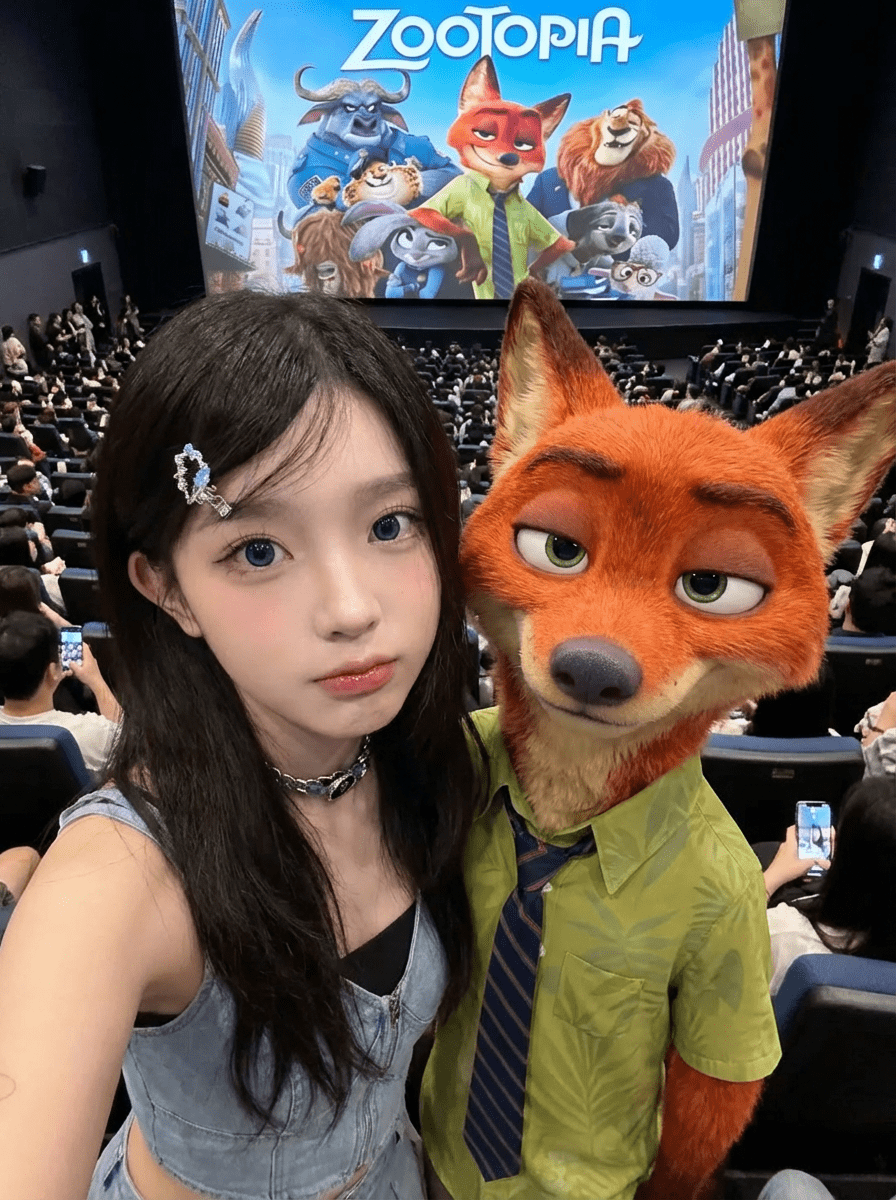
What the AI does for your Zootopia 2 photo:
- Preserves your facial features, hairstyle, and makeup from your selfie
- Maintains Judy Hopps' police uniform, badge, and proportions
- Keeps Nick Wilde's fur texture, green shirt, and expression consistent
- Applies soft lighting that creates the Zootopia 2 photo trend aesthetic
What the AI cannot do:
- Create real-time Zootopia 2 AR filters (these are static images)
- Generate official Disney merchandise or licensed content
- Guarantee identical results on every attempt
5-Step Free Zootopia 2 Filter Tutorial
This step-by-step free Zootopia 2 filter tutorial walks through the entire process of taking a photo with Judy Hopps and Nick Wilde. Updated for December 2025.
Step 1: Select Zootopia 2 Characters
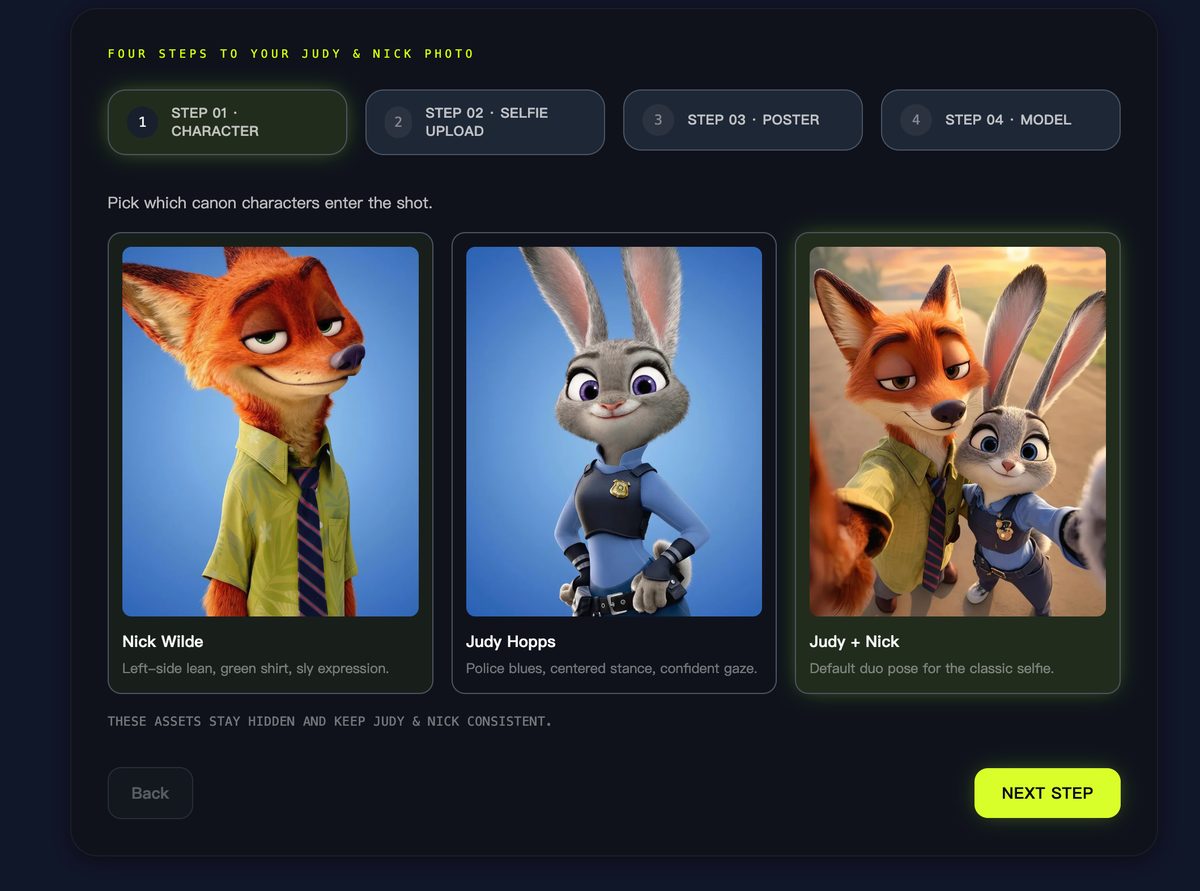
Open the Zootopia 2 Photo Generator and choose your characters:
| Option | Character Position | Zootopia 2 Photo Use Case |
|---|---|---|
| Nick Wilde | Left side, leaning | Solo photo with Nick Wilde |
| Judy Hopps | Center, confident stance | Solo photo with Judy Hopps |
| Both | Classic duo arrangement | Full Zootopia 2 trio selfie |
The "Both" option places you between Judy Hopps and Nick Wilde — the most popular choice for the Zootopia 2 photo challenge.
Step 2: Upload Your Selfie for the Zootopia 2 Photo
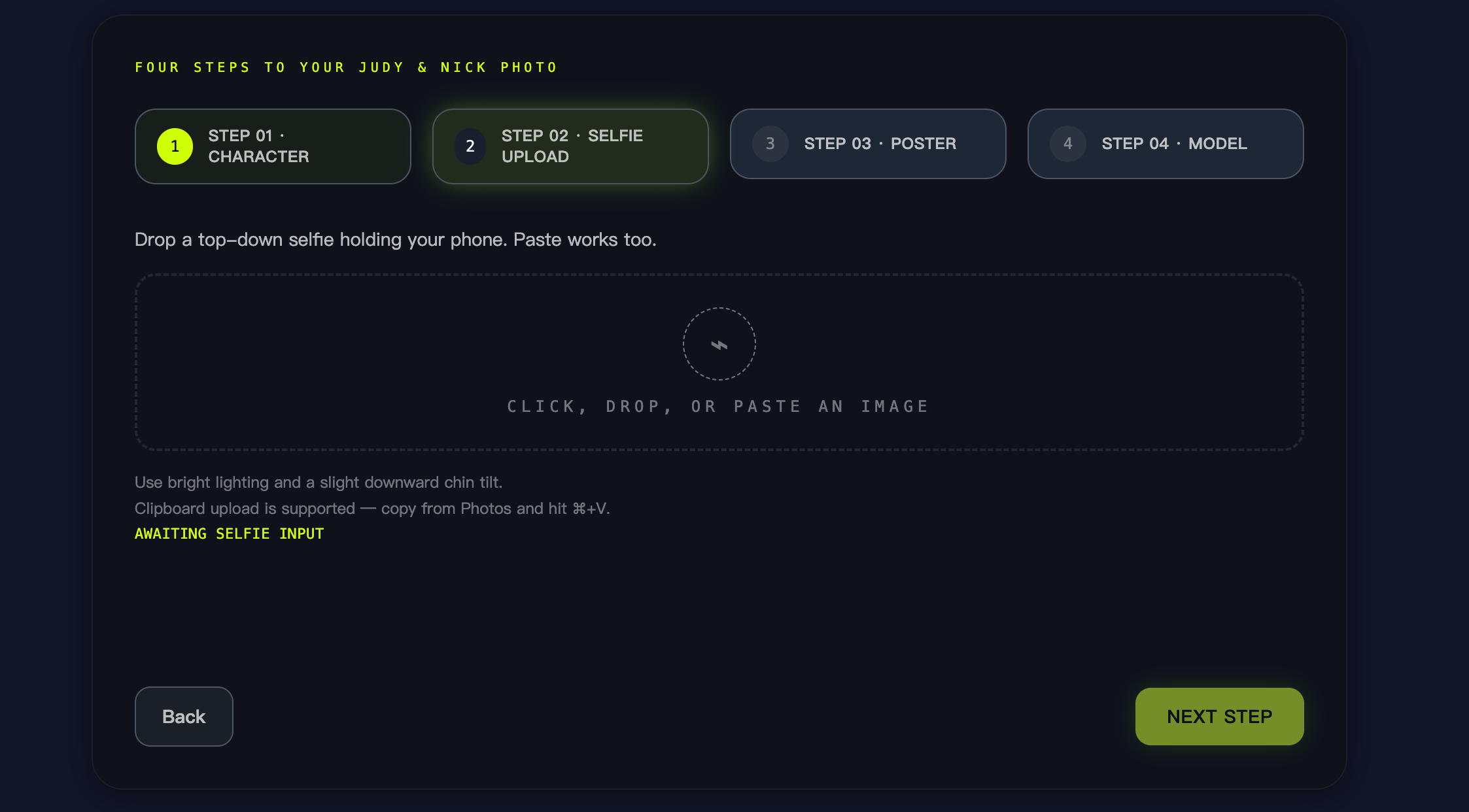
Upload a top-down selfie for your Zootopia 2 photo. For consistent results:
- Lighting: Bright, even lighting without harsh shadows
- Angle: Phone slightly above eye level, chin tilted slightly down (this matches the Zootopia 2 photo trend style)
- Background: Any background works; the AI replaces it with the Zootopia 2 cinema scene
- File size: Under 10MB (PNG, JPG, or WebP)
Input methods: Click to select, drag & drop, or paste from clipboard (Cmd+V on Mac, Ctrl+V on Windows).
Step 3: Choose Zootopia 2 Background Poster
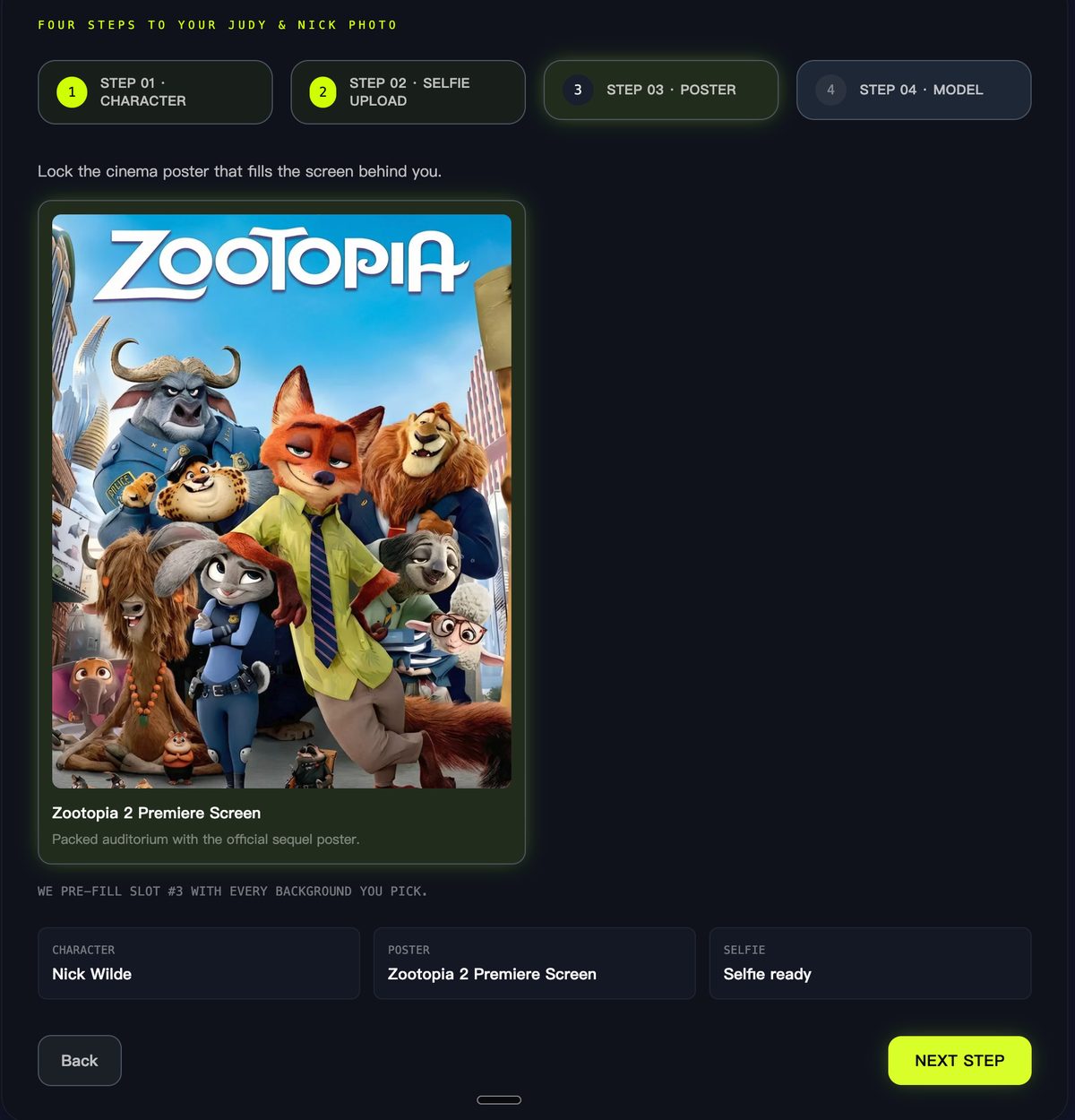
The default "Zootopia 2 Premiere Screen" places your Zootopia 2 photo in a cinema auditorium with:
- The Zootopia 2 movie poster displayed on screen
- Silhouetted audience in the background
- Dim ambient lighting typical of a Zootopia 2 premiere theater
Step 4: Select AI Model for Your Zootopia 2 Photo
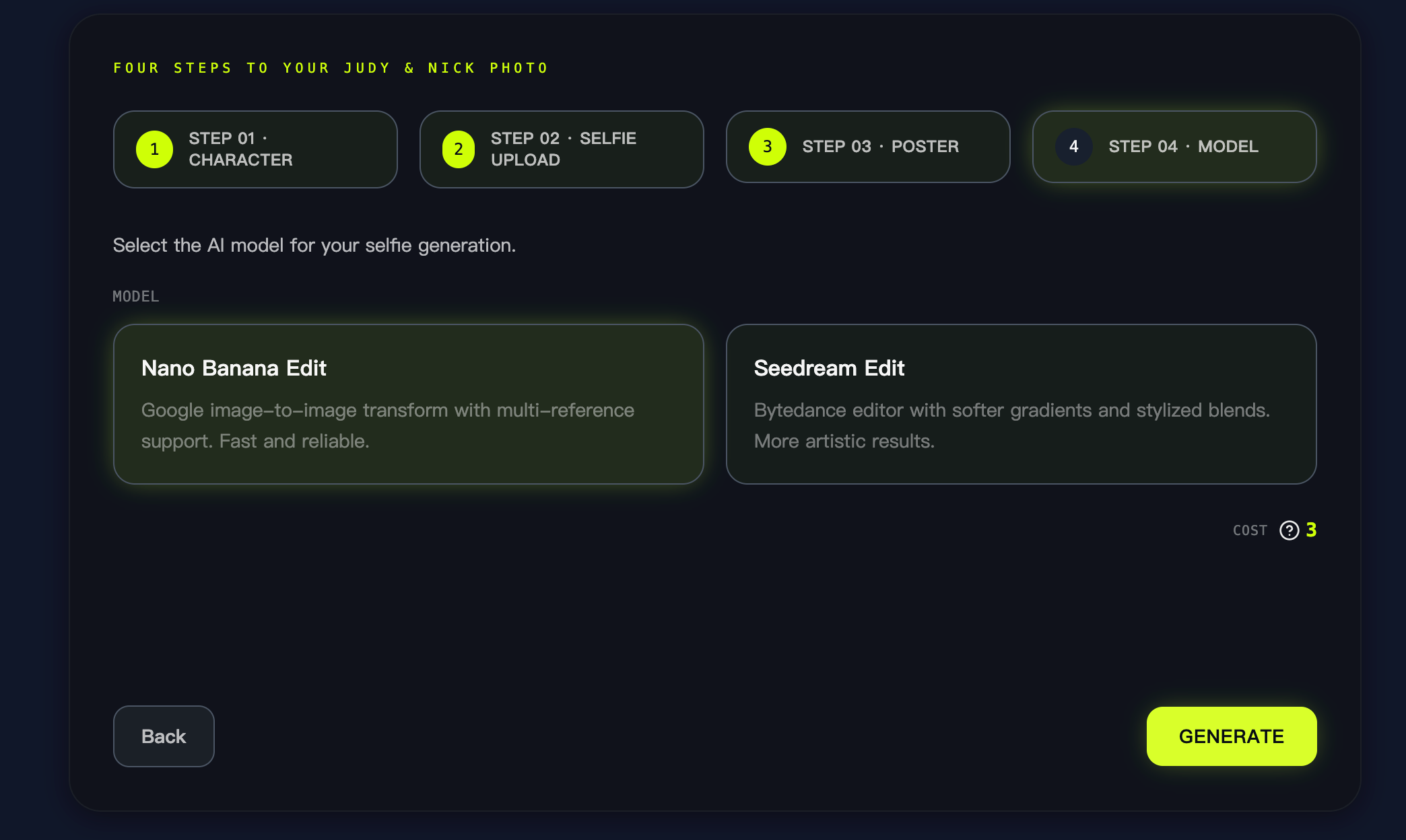
Two models are available for your Zootopia 2 photo:
| Model | Provider | Characteristics | Cost |
|---|---|---|---|
| Nano Banana Edit | Fast, reliable Zootopia 2 photos with multi-reference support | Free tier available | |
| Seedream Edit | ByteDance | Softer gradients, more artistic Zootopia 2 photo blends | Free tier available |
Recommendation: Start with Nano Banana Edit for consistent Zootopia 2 selfie results. Try Seedream Edit if you prefer a more stylized Zootopia 2 photo look.
Step 5: Generate and Download Your Zootopia 2 Photo
Click Generate. Your Zootopia 2 photo typically processes in 10-30 seconds. Once complete:
- Download: PNG or WebP format for your Zootopia 2 selfie
- Share: Direct posting to X, TikTok, Instagram, Facebook, Reddit, WhatsApp, Telegram
- Embed: Copy CDN link for use in Zootopia 2 photo challenge posts
The Actual Prompt We Use
This is the exact prompt that generates the Zootopia 2 demo images. This is not a template — it's the production instruction we use:
Do not swap faces - no changes to facial features allowed!

Merge the subjects from [Image 1] and [Image 2] into a top-down selfie photo.
Composition should be tight, with subjects from [Image 1] and [Image 2] very
close together, heads slightly tilted up, eyes looking directly at the camera,
creating strong visual impact.

The left person stands slightly forward, must maintain facial similarity;
body slightly turned inward. Shooting angle is high-angle overhead,
exaggerating the head proportions - typical J-pop/K-pop visual selfie style.

Visual style leans toward Japanese visual-kei, overall image clarity is high,
shot with iPhone front camera selfie, final result should be refined and
fashionable.

Subjects must seamlessly blend into the frame with natural visual transitions.
Overall lighting should be bright and even.

Background is a large cinema filled with audience, two people have their backs
to the screen, screen displays Reference [Image 3] - exquisite Zootopia 2
poster filling the screen.

Aspect ratio 3:4.
This prompt works with Flux-Kontext or Nano Banana Pro models. You can also experiment with Flux-2 for different results. Adjust the background description for different Zootopia 2 photo settings.
Zootopia 2 Photo Methods Compared
How does this Zootopia 2 photo generator compare to other ways of taking a photo with Judy Hopps and Nick Wilde?
| Method | Pros | Cons | Best For |
|---|---|---|---|
| Disney Parks Meet & Greet | Authentic Zootopia 2 experience, real costumes | Requires park visit, limited poses, long queues | Fans who prioritize the in-person Zootopia 2 experience |
| Photoshop Compositing | Full manual control over your Zootopia 2 photo | Requires editing skills, time-consuming, need character assets | Professional designers |
| MidJourney / DALL-E | Powerful generation | No Zootopia 2 character locking, inconsistent Judy Hopps/Nick Wilde likeness | General AI art, not Zootopia 2 specific |
| Snapchat / TikTok AR Filters | Real-time Zootopia 2 AR selfie, easy to use | Lower resolution, limited Zootopia 2 customization | Quick Zootopia 2 social posts |
| SynBooth Zootopia 2 Generator | Zootopia 2 character-locked designs, repeatable poses, prompt transparency | AI-generated (not real), requires account | Creators needing consistent Zootopia 2 photos |
Zootopia 2 TikTok Trend Tips
The Zootopia 2 TikTok trend centers on before/after reveals. Here's how to participate in the Zootopia 2 photo trend on social media:
Content idea for the Zootopia 2 TikTok trend: Show your original selfie, then transition to your Zootopia 2 photo with Judy Hopps and Nick Wilde.
Hashtags used for the Zootopia 2 TikTok trend:
- #Zootopia2
- #JudyHopps
- #NickWilde
- #AIPhoto
- #ZootopiaChallenge
Zootopia 2 Instagram Reel Ideas
Looking for Zootopia 2 Instagram reel ideas? The Zootopia 2 photo trend works well on Instagram with this format:
Zootopia 2 Instagram reel idea: Film yourself "walking into" a cinema, then cut to your AI-generated Zootopia 2 premiere photo with Judy Hopps and Nick Wilde.
Optimal format for Zootopia 2 Instagram content: 9:16 vertical for Reels, 4:5 for feed posts featuring your Zootopia 2 selfie.
Zootopia 2 Snapchat Lens Alternative
While SynBooth doesn't offer a real-time Zootopia 2 Snapchat lens, the generated Zootopia 2 photos work as saved Snaps for your Zootopia 2 AR selfie ideas:
- Save your Zootopia 2 photo and upload to Snapchat Stories
- Add location stickers or time stamps for context
- Note: This is a Zootopia 2 Snapchat lens alternative — you're uploading a pre-generated Zootopia 2 photo, not using real-time AR
Troubleshooting Your Zootopia 2 Photo
| Issue | Cause | Solution |
|---|---|---|
| Judy Hopps or Nick Wilde proportions look off | Selfie angle doesn't match Zootopia 2 photo prompt | Retake selfie with phone above eye level, slight chin tilt |
| Faces look distorted in Zootopia 2 photo | Image too low resolution | Upload higher resolution source for your Zootopia 2 selfie |
| Zootopia 2 photo upload fails | File exceeds 10MB | Compress image before uploading |
| Zootopia 2 results vary between generations | AI models have inherent randomness | Generate 2-3 Zootopia 2 photo variations and pick the best |
| Skin looks plastic in Zootopia 2 selfie | Model overapplied smoothing | Try Seedream Edit for more natural Zootopia 2 photo texture |
FAQ
Is the Zootopia 2 filter really free?
Yes. The free Zootopia 2 filter is available after creating a SynBooth account. You can generate Zootopia 2 photos with Judy Hopps and Nick Wilde at no cost using the free tier. Premium models with higher resolution require credits (pricing at /pricing).
Can I use my Zootopia 2 selfie commercially?
For Zootopia 2 photo tutorials, fan projects, and social media content: yes. For official merchandise or paid advertising featuring Judy Hopps or Nick Wilde: review Disney IP guidelines separately. SynBooth generates Zootopia 2 concept art, not licensed assets.
How is this different from a Zootopia 2 Snapchat lens?
A Zootopia 2 Snapchat lens runs in real-time with lower resolution. SynBooth generates static, higher-resolution Zootopia 2 photos with consistent Judy Hopps and Nick Wilde designs. You upload once, receive a processed Zootopia 2 photo.
Which model should I choose for my Zootopia 2 photo?
- Nano Banana Edit: Faster, more consistent Zootopia 2 photos, better for faces
- Seedream Edit: More artistic Zootopia 2 photo results, softer gradients, stylized look
Why do my Zootopia 2 photo results look different from the examples?
The AI interprets each Zootopia 2 selfie input uniquely. Lighting, angle, and facial position all affect your Zootopia 2 photo output. The Zootopia 2 examples on this page were selected from multiple generations.
Limitations
This Zootopia 2 photo tool generates AI art based on Judy Hopps and Nick Wilde character references. Key limitations:
- Not official Disney Zootopia 2 content — These are fan-generated Zootopia 2 images, not licensed material
- Zootopia 2 photo results vary — AI generation has inherent randomness; not every Zootopia 2 selfie will be perfect
- Static Zootopia 2 images only — This is not a real-time Zootopia 2 AR filter or video tool
- Judy Hopps and Nick Wilde accuracy — While we lock Zootopia 2 character designs, slight variations may occur
- Commercial use of Zootopia 2 photos — Review Disney IP guidelines before using in ads or merchandise
Try the Free Zootopia 2 Filter Now
The free Zootopia 2 filter on the Zootopia 2 Photo Generator is available on SynBooth.com. Create your Zootopia 2 selfie with Judy Hopps and Nick Wilde in under a minute:
- Sign in (free account)
- Upload your selfie
- Select Zootopia 2 characters and model
- Generate and download your Zootopia 2 photo
Related Resources
- AI Image Generator — SynBooth's main image generation tool
- Nano Banana Pro Model — The model powering Zootopia 2 photos
- Flux-2 Model — Alternative model for different artistic styles
- Pricing — Credit packages and subscription plans
- My Creations — View and manage your generated Zootopia 2 photos
- All Blog Posts — More tutorials and AI generation guides